


Start with the customer
What is a tote rental website?
A tote rental website explains what customers can rent, when it is available, where you deliver or offer pickup, and how to request a rental online. The useful version connects those choices to your actual packages, date-range capacity, customers, and fulfillment workflow.
A basic information page can describe your business. A booking website also lets a customer choose a package and rental dates, provide contact and delivery details, and send a request. Behind that form, someone still needs to check what is ready, collect payment through the chosen process, prepare the correct tote and dolly counts, and plan the handoff.
Operators often assemble that flow from a site builder, package pages, a form, a calendar, payment links, delivery notes, customer records, and an inventory spreadsheet. A purpose-built system can keep those pieces connected. For more on the operating side, see tote rental software for bookings and inventory.
Plan the booking experience
What does a tote rental website need?
Answer the questions a customer needs to make a useful request. Clear details reduce follow-up and help you decide whether the requested rental can be fulfilled.
Packages and quantities
Show the tote count in each package and whether dollies are included. Make package names and descriptions specific enough that customers can compare options.
Rental periods and prices
Explain how long a rental lasts and show a price for each package and period. If you use day, week, or month rates, make the period boundaries clear.
Real date availability
Capacity depends on overlapping rentals and the tote and dolly pool you share across packages. Keep owned quantities and any safety buffer accurate before exposing dates to customers.
Service area and handoff
Say where you deliver, whether customers can collect or return totes themselves, and which delivery or pickup windows they can request.
Booking and contact details
Let customers choose a package and dates, then collect the name, email, phone, address, and instructions you need to review and fulfill the request.
Payment and rental terms
Explain your supported payment path and present rental terms before customers submit. ToteRentalSuite supports manual payment workflows and payments through a connected Stripe account.
Mobile usability
Many customers compare moving options on a phone. Make packages, prices, dates, and the booking action easy to read and tap on a small screen.
Business identity
Include a working email or phone, a clear service area, and your business name. A domain helps customers recognize the site; every ToteRentalSuite plan starts with a hosted website address.
A practical launch sequence
How do I create a tote rental website?
Create an account, enter your business details, set up tote packages and rental pricing, configure fulfillment and payment rules, customize the public website, then preview the customer booking flow before publishing.
Create your account
Register with your name, business name, email, and password. ToteRentalSuite's Free plan does not require a credit card and includes a hosted public booking website.
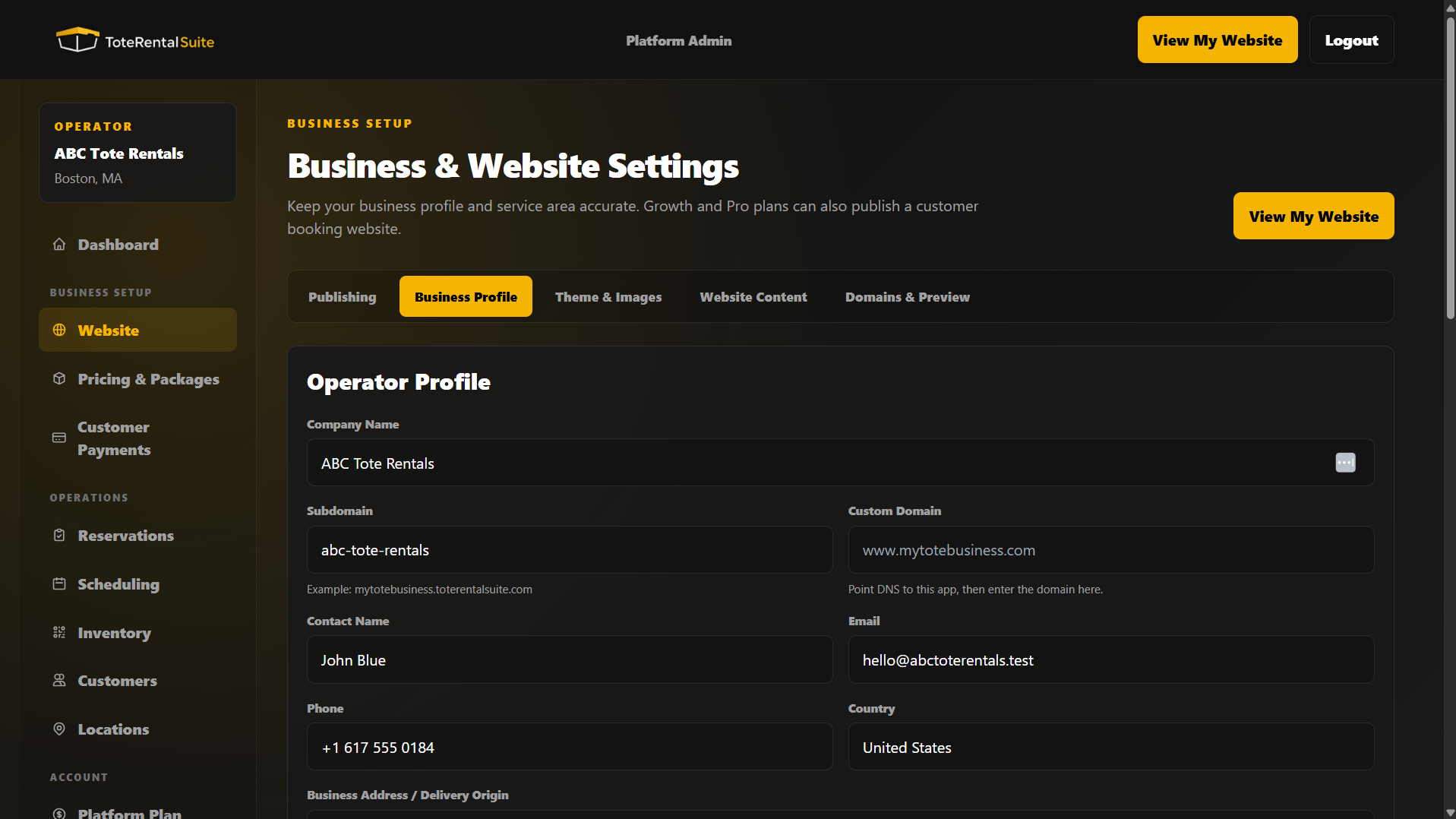
Fill in your business profile
In Easy Setup, confirm your contact details, business address, and primary service area. Customers should be able to tell who serves them and how to reach you.
Build packages and rental prices
Use the Rentals step to review package sizes, inventory, rental durations, and a price for every package-and-duration combination. Include dolly quantities where the package requires them.
Configure fulfillment and availability
Choose delivery or customer pickup and set the time windows customers can choose. Check tote counts, dolly counts, and any operational buffer against reservations that overlap the requested rental dates.
Choose how customers pay
In Customer Payments, select a supported manual payment workflow or connect Stripe for customer rental payments. The Stripe customer-payment connection is separate from your ToteRentalSuite subscription.
Customize the hosted website
In Website & Brand, choose the publishing workflow and review the theme, appearance, color, logo, and hero image available to your plan. The Easy Setup action opens the Website settings in the operator app.
Preview the booking as a customer
Check the public website on a phone and desktop. Make sure package descriptions, periods, prices, available dates, fulfillment choices, rental terms, and contact details are correct.
Publish and keep the operation ready
Enable the public website when you are ready to receive customer requests. Review new bookings, payment status, and the preparation list so the promised tote and dolly quantities are ready for handoff.
Set a realistic expectation
Can I build my tote rental website in five minutes?
You can begin setting up a hosted tote rental website in minutes, especially if your business details, package sizes, prices, and service area are ready. Completing and checking the full booking setup can take longer.
Account registration is one step. To be ready for useful booking requests, you still need accurate package quantities, rental periods and rates, fulfillment choices, payment rules, and a customer-facing design. Connecting a payment account or domain may require information from your provider and can take longer than filling in the first website details.
The fastest useful launch is a small, accurate catalog: a few clear packages, the rental periods you actually offer, a service area you can cover, and honest availability. You can refine themes and optional website settings after the core booking information is right.
The website is the start
What happens after the first booking?
A tote rental website is most useful when its booking connects to the rest of the rental work. The customer request gives the operator a record to review; the date range and quantities then guide payment follow-up, preparation, and the delivery or pickup plan.
For example, a request for 40 totes and 4 dollies is not just a form entry. You need to see whether that capacity is already committed during the requested dates, prepare physical assets for the right booking, and update their status as the rental is delivered and returned. ToteRentalSuite keeps packages, shared inventory, booking records, payment status, scheduling, customer history, and QR-ready asset records connected.
QR workflows can help identify individual totes during preparation, scans, returns, and inventory checks. Allow time for cleaning, late returns, damage, and missing items when deciding how much fleet capacity to make available.
See the broader reusable moving box rental workflow or the guide to starting a tote rental business.
Choose the publishing path that fits
Do I need my own domain or an existing website?
Start with the hosted website
Every current ToteRentalSuite plan includes a customizable public booking website on a ToteRentalSuite address. You can begin there and connect a domain you already own when your plan supports it.
Growth and Pro include connecting a custom domain. Business includes a domain-registration request process; domain registration is not an instant self-service setup. Check the current plan comparison for the plan details before choosing.
Keep the website you already have
If you have a Wix, Squarespace, WordPress, or manually built website, you can keep it. Growth and higher include the embedded booking widget, which adds the booking workflow to an existing site. The widget is not included on Free.
This means you can start with a hosted page, connect a domain on an eligible plan, or add the booking widget to a site you already maintain. You do not need to replace a site that is already working for you.
Choose tools around the work
Website builder or tote rental software?
A general website builder helps you publish pages and present a brand. Rental software helps organize the rental transaction. A tote rental business needs both sides to meet: packages and periods on the public site must make sense alongside shared physical inventory, delivery, pickup, payment follow-up, returns, and customer records.
ToteRentalSuite is built for moving tote and reusable moving box operations. The product includes a hosted customer website and booking flow alongside the operator tools for packages, date-range availability, tote and dolly inventory, scheduling, payments, and returns. That connection is the practical difference: customers can send a booking request through the site and operators can continue the work from the same system.
Review the tote rental business software overview for the complete operation, or visit the tote rental directory to see how local providers present their services.